# Introduction to GAME Credits
Welcome to the GAME Credits Platform. Founded in 2014, GAME Credits is the first gaming cryptocurrency. On the GAME Credits Platform, users can create, buy and sell non-fungible tokens without paying gas, as well as stake GAME Credits on their favorite creators or projects in order to earn GAME and Loyalty Points that can be redeemed for NFTs from participating creators. This document guide will walk you through each of the steps of getting set up on and using our platform.
**Creating Gasless NFTs On The GAME Credits Foundry**
Creating NFTs on the GAME Credits Foundry is easy. And best of all, because the NFTs are created on the Polygon/Matic sidechain, there is no gas fee to create, sell, or purchase NFTs on the GAME Credits Platform. The GAME Credits Foundry allows creators to create and sell NFTs in a variety of file formats including JPEGs, PNGs, MP4s and GIFs. For a detailed guide on how to create NFTs on the GAME Credits Foundry, click here.
**Buying And Selling NFTs On The GAME Credits Marketplace**
As a user, you have the ability to browse and purchase a wide variety of NFTs on the GAME Credits Platform. You can purchase NFTs directly from creators by visiting their creator pages. You can also buy NFTs and sell NFTs you have previously purchased on the GAME Credits Marketplace. All transactions on the GAME Credits Platform occur in GAME Credits’ native crypto currency GAME. For more information, see our detailed guides on buying NFTs from creators and buying and selling NFTs on the GAME Credits Marketplace.
**Staking GAME On The GAME Credits Rewards Portal**
Staking GAME on the GAME Credits Rewards Portal is a great way for users to earn extra GAME by staking their GAME on their favorite creators. Users can also earn Loyalty Points from creators that have enabled them and trade in those Loyalty Points for NFT from those creators. Creators, in turn, will earn GAME each week proportionate to the amount of GAME that has been staked on them. A total of 100,000 GAME is rewarded each week to creators and users on the GAME Credits Rewards Portal. For more information on staking on the GAME Credits Rewards portal, check out these detailed guides for creators and users.
# Signing Up For A GAME Credits Account
Signing up for the GAME Credits Portal gives full feature access to the platform! To sign up, visit the GAME Credits Portal at app.gamecredits.org. Upon arriving at the Portal page you will see multiple options to sign up or log in.
**Step 1: Click The Signup Button**
* Click the “Sign Up” button in the top right corner.

* Alternatively, under the “My Account” section midway down the page, click “Sign Up.”

**Step 2: Create An Account**
* The GAME Credits Portal allows you to sign up solely by connecting a Metamask wallet. However, to enable the full features of the platform and stay up to date on all the latest GAME Credits news and features, you can also associate an email address and password with your account.

**Step 3: Verify Your Email Address**
* Signing up via email will require that you verify your email address.

**Step 4: Link Your Metamask Wallet To Your GAME Credits Account**
* If you already have MetaMask installed in your browser, you’ll be prompted to link your GAME Credits Account to your MetaMask Wallet. This is done to associate your Ethereum address with your GAME Credits Account. Complete this process with the Ethereum address you intend to use on the Portal. Only once your account has been linked to an Ethereum address will you be able to enjoy the full features of the Portal such as the ability to create, purchase, and sell NFTs and stake GAME on creators and collect GAME Rewards.

* Click “Confirm”, then sign the transaction from the resulting MetaMask prompt to finish linking your accounts.
* Congratulations! You now have a GAME Credits Account.
# Installing MetaMask
The MetaMask Wallet is a browser-based Ethereum wallet that will allow you to store ERC-20 cryptocurrency tokens, non-fungible tokens, and to interact with the GAME Credits Portal. While GAME Credits has no affiliation with MetaMask, to assist you in the installation of MetaMask so that you can use our Portal, we have included the below guide. For the most up to date information on MetaMask including how to install it, you can go to
**Requirements**
1. Supported web browser
1. Google Chrome
2. Mozilla Firefox
3. Brave
4. Microsoft Edge
**Step 1: Begin The Installation On The MetaMask Website**
* Start by going to the MetaMask [website](https://metamask.io/download.html). For this instruction we will be installing Metamask on Chrome.

* Make sure the ‘Chrome’ tab is selected, then press ‘Install Metamask for Chrome’.
* MetaMask isn’t a traditional program that you’d install on your desktop, it lives as an extension in the Chrome web browser. Here you are adding the MetaMask extension to your Chrome browser. Click ‘Add to Chrome’

**Step 2: Set Up MetaMask**
Once installed, begin the setup process by clicking ”Get Started”

* You will be presented with two choices. You can either import an existing wallet using a 12 word seed phrase, or you can create another. In this case, we’re creating a new wallet. Press “Create Wallet.”

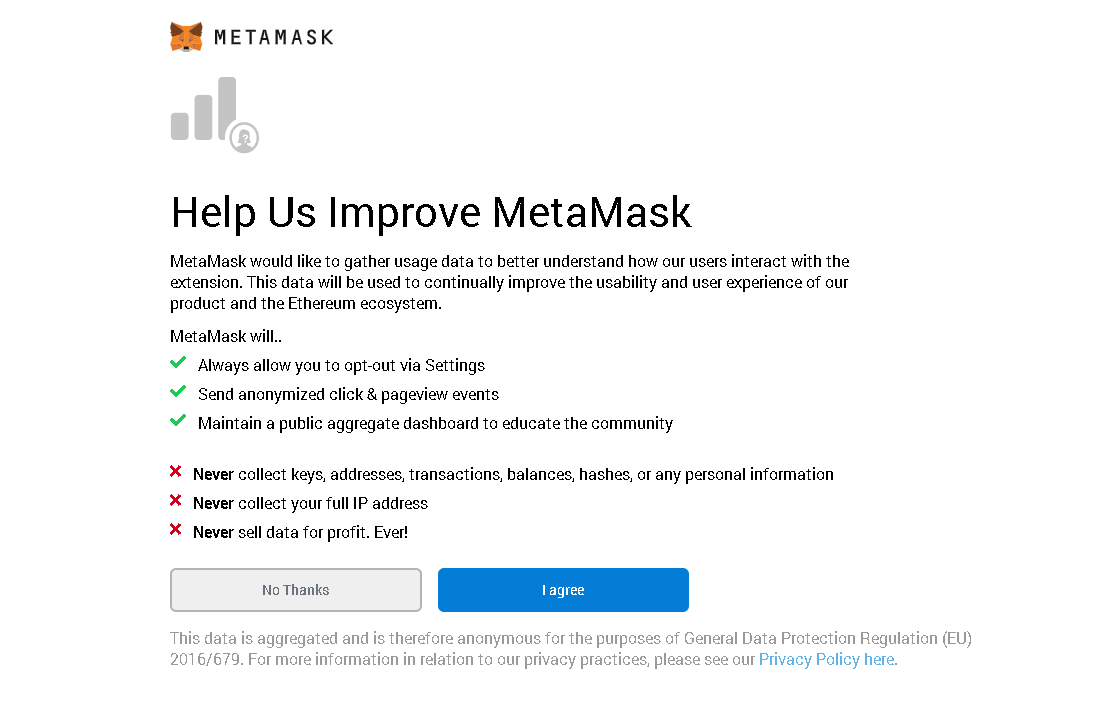
* Choose your MetaMask usage data settings
**.**
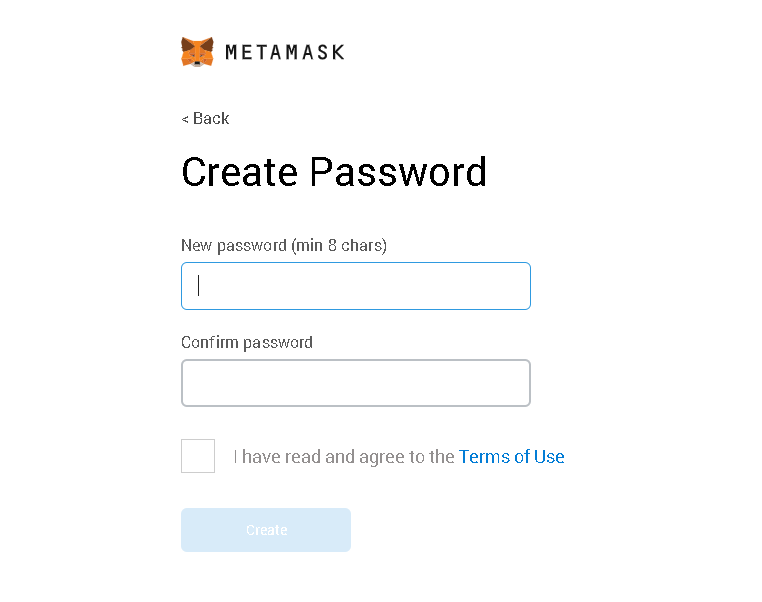
* Create a strong password of sufficient length, then read and agree to the terms of use. Click ‘Create’.
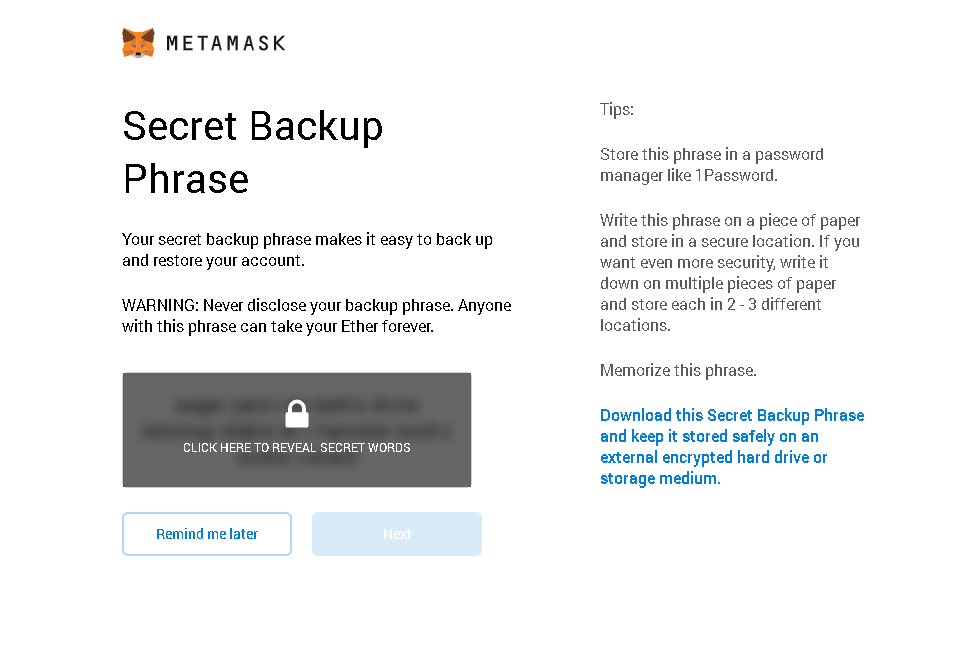
* At this screen, make sure to backup your secret phrase! This is the only way to recover and import your wallet. NEVER share your secret phrase with anyone.
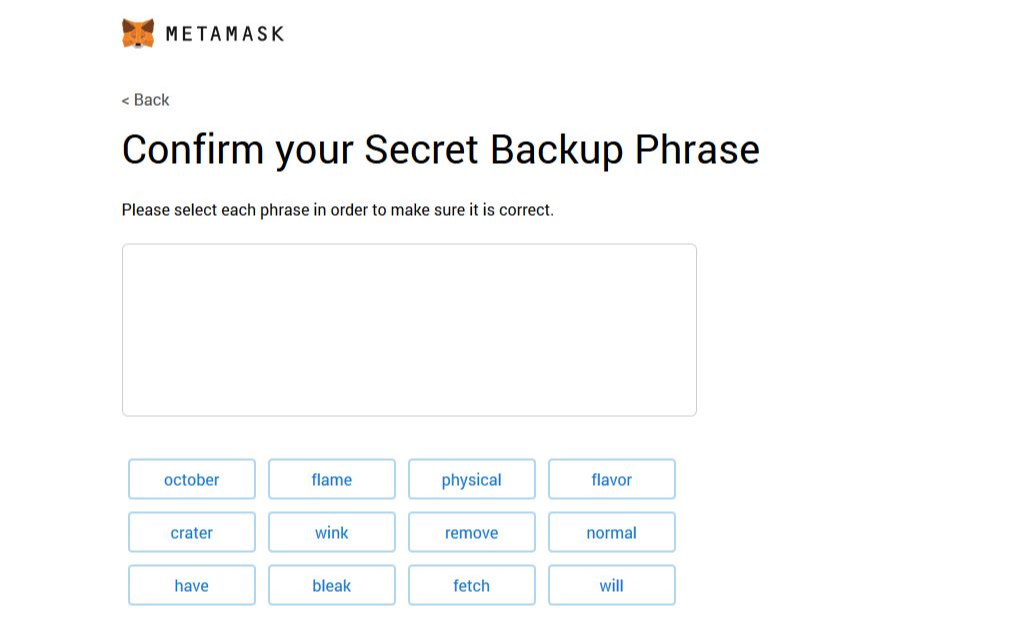
* If you followed step 8 you should have your phrase saved somewhere. Put it in the correct order here and click continue.
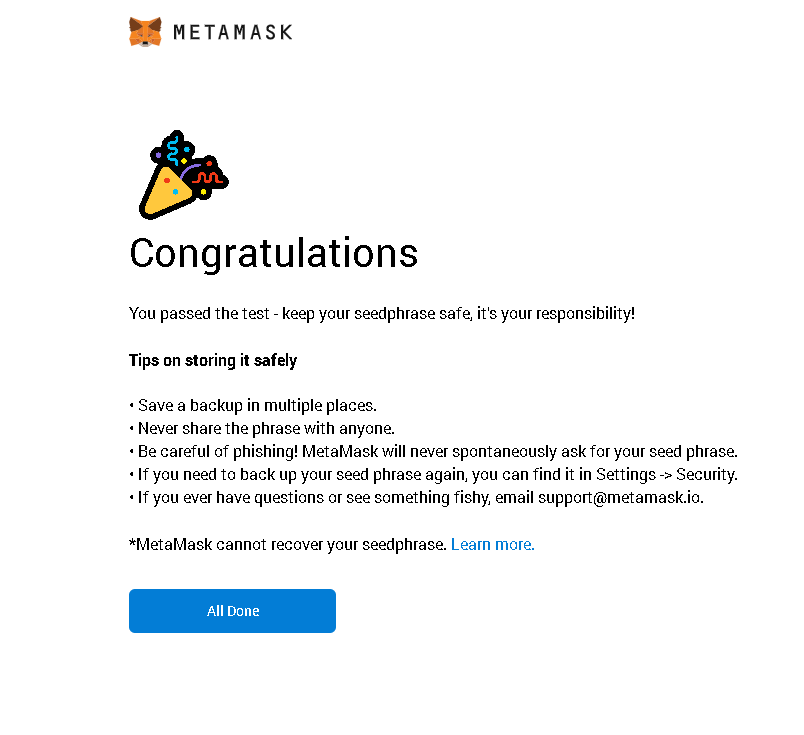
* Congrats, you’re all done!
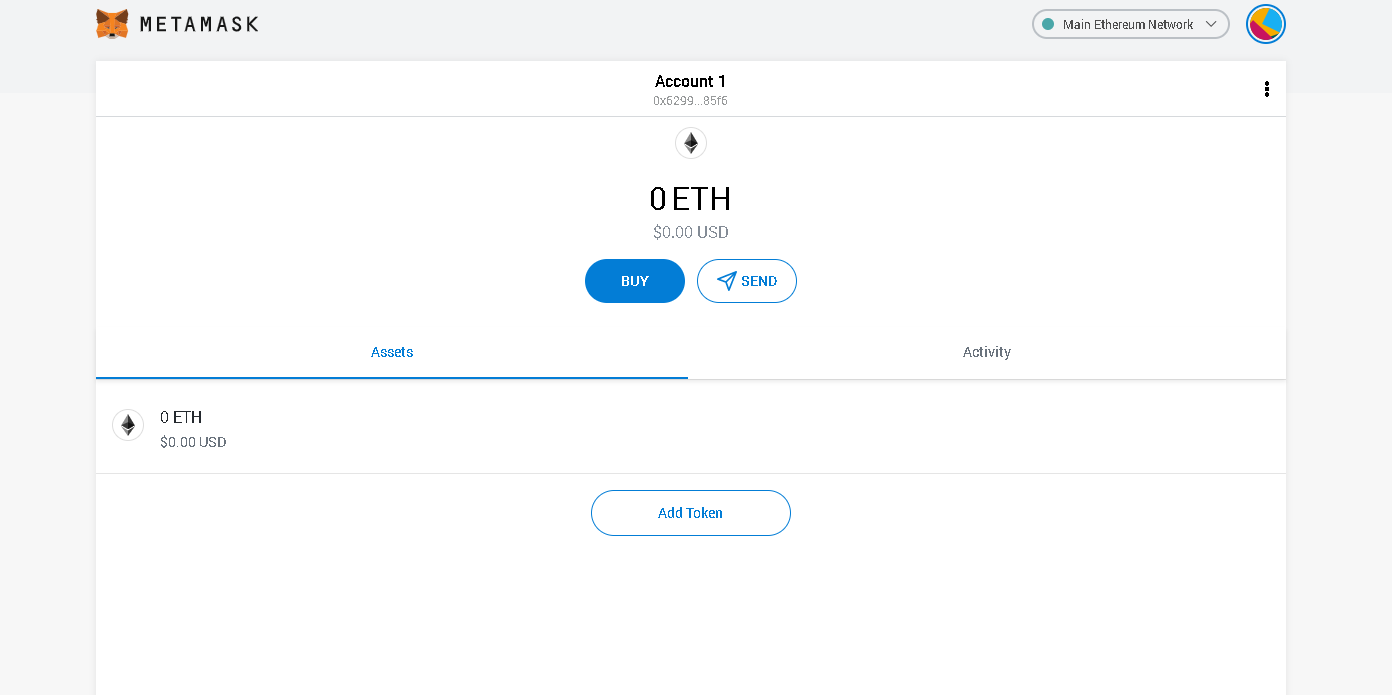
* You should be taken directly to your new wallet. You can also get to MetaMask anytime by clicking on the extension icon near your address bar.
# Adding GAME to MetaMask
**Adding GAME to MetaMask On Ethereum Mainnet (Layer 1)**
**Step 1: Click Add Token**
Go to your MetaMask extension in your browser and click “Add Token.”

**Step 2: Search For The GAME Token**
Search for “GAME Credits” in the search bar and select it, click Next, then click Add Tokens.

* GAME will now be listed as a visible token in MetaMask

**Adding GAME to MetaMask On The Matic Blockchain (Layer 2)**
**Requirements:**
1. Metamask wallet
2. Matic mainnet RPC configured in MetaMask (see setup article [here](https://docs.gamecredits.org/general/adding-polygon-matic-network-to-metamask))
**Step 1: Select Matic Network And Click Add Token**
* Go to your MetaMask extension, select the Matic network in the network dropdown at the top of MetaMask, and click ‘Add Token’

**Step 2: Add A Custom Token**
* Click “Custom Token” then paste the GAME-MATIC contract address “0x8d1566569d5b695d44a9a234540f68D393cDC40D” into the “Token Contract Address” field. The remaining fields will auto populate.

* Click “Next” then “Add Tokens”

* GAME will now be visible in MetaMask on the Matic Network.
* It is important to note that the tokens that are visible for you are dependent on the network you have selected in the network dropdown. The GAME contract for the sidechain will **not** have the GAME logo. The GAME contract for ethereum mainnet will have the GAME logo.

# Adding Polygon (Matic) Network to MetaMask
Please note that it is not required to add the Matic network to MetaMask to interact with the GAME Credits Portal. However, doing so will allow you to easily track your GAME balance on the Matic Network and may be required to view and trade your NFTs created or bought on the GAME Credits Portal when using third-party platforms such as Opensea.
We recommend you check the Matic/Polygon documentation hub for the most up to date configuration information. This can be found here:
**Step 1: Add A Custom RPC**
* Open MetaMask and login.
* To add Matic’s Mainnet, click on the Network selection dropdown and then click on Custom RPC.

**Step 2: Add Matic Mainnet Information**
* Once you click “Add Custom RPC,” it will open up a form with 2 tabs on the top, Settings and Info. In the Settings tab you can add the URL . Ensure you’ve typed every field in as displayed below, including the “Network Name” as you’d like it to be displayed.

* Once you’ve added the URL in the New Network field, click on Save. You will be directly switched to Matic’s Mainnet now in the network dropdown list. You can now close the dialog.
# Acquiring GAME
Acquiring GAME Credits can be done in many ways. GAME Credits is currently available on both CEXs (centralized exchanges) and DEXs (decentralized exchanges). There are benefits and disadvantages to each.
\***NOTE FOR GENESIS WORLDS MINING CLAIMS SALE**\*
If you wish to use $GAME for purchasing [Genesis Worlds Mining Claims](https://genesis.game/mining), you need to either purchase on or [move it](https://docs.genesis.game/genesis-worlds-metaverse/Guides/moving-game-to-polygon) to a Layer 2 solution so it is available in your MetaMask Wallet on the MATIC (Polygon) Network. You can buy GAME Credits directly on Polygon at [Quickswap](https://info.quickswap.exchange/token/0x8d1566569d5b695d44a9a234540f68d393cdc40d) or buy GAME Credits on [Bittrex](https://bittrex.com/Market/Index?MarketName=BTC-GAME), [BitBay](https://bitbay.net/en/exchange-rate/game-price-btc), or [Uniswap](https://uniswap.info/token/0x63f88A2298a5c4AEE3c216Aa6D926B184a4b2437), and then deposit them onto Polygon using the Polygon wallet.
If you already have GAME Credits on Ethereum, deposit them onto Polygon using the Polygon Wallet to use them on the Genesis Worlds site. [Depositing GAME to Polygon](https://docs.genesis.game/genesis-worlds-metaverse/Guides/moving-game-to-polygon) lets you use Polygon transactions, which cost less than a fraction of a cent per transaction.
And, when you deposit GAME onto Polygon, the GAME Credits Matic faucet will automatically make sure you have enough Matic to pay the gas fees of your first few transactions, so you won't even have to worry about gas.
**CEXs**
Centralized exchanges will require you to create an account. They may also require you to provide some of your personal information in regards to KYC/AML laws. When creating your account we recommend you set a very strong password and **always** use 2fa/mfa when it is provided to you as an option.
* [Bittrex](https://bittrex.com/Market/Index?MarketName=BTC-GAME)
* [BitBay](https://bitbay.net/en/exchange-rate/game-price-pln)
* [Hotbit](https://www.hotbit.io/exchange?symbol=GAME_USDT)
* [Whitebit](https://whitebit.com/trade-pro/GAME_ETH?type=spot)
* [Dove Wallet](https://dovewallet.com/en/trade/spot/game-eth)
* [Coinspot](https://www.coinspot.com.au/buy/game)
**DEXs (Layer 1)**
DEXs require only that you connect to MetaMask or another wallet under your control and allow permission for the DEX to make the desired transactions in your wallet
* [Uniswap](https://info.uniswap.org/pair/0x5397d87eb8ddd36f631b704653a3ab2bf1739467)
**DEXs (Layer 2 - Polygon/Matic)**
Layer 2 DEXs operate on a sidechain of Ethereum. Quickswap functions on the Polygon (formerly known as Matic) network. They operate the same way Layer 1 DEXs but provide even faster transaction times and lower transaction fees.
* [Quickswap](https://info.quickswap.exchange/token/0x8d1566569d5b695d44a9a234540f68d393cdc40d)
**Please note:** Exchanges are third party entities and are not under the administration of the GAME Credits team.
**Requirements:**
* MetaMask or other Ethereum wallet installed installed ([how to install MetaMask](https://docs.gamecredits.org/general/installing-metamask))
* GAME Credits token contract added to MetaMask ([Adding GAME to MetaMask](https://docs.gamecredits.org/general/adding-game-to-metamask))
**Tips:**
* Always visit for the most up to date exchange and DEX listings. You can also view some currently tracked GAME Credits trading pairs at Coinmarketcap () and CoinGecko ()

# Buying NFTs Directly From Creators
**Requirements:**
* MetaMask Wallet
* GAME balance in MetaMask Wallet
* Ethereum balance in MetaMask Wallet (for associated gas fees if you have not already acquired GAME on the Polygon/Matic sidechain)
**Step 1:**
* Browse to app.gamecredits.org. On the Home page you will see a “Featured Creators” section as well as a “Featured Collectibles” section. The featured collectibles are some of those offered for sale by creators on the Portal.

* Before attempting to make a purchase, it is a good idea to deposit your GAME balance from the Ethereum mainnet to the Polygon/Matic sidechain. Scroll down the home page and a section with your balances is visible. Click “Deposit” on the mainnet balance to deposit it to the sidechain. This will incur an Ethereum gas fee. If you do not deposit to the sidechain before making a purchase, you will be prompted to do so during the purchase process.

* For a more detailed look, click the “Rewards” section in the left hand pane. All creators on the Portal are visible from here with optional sorting capabilities at the top of the page.

**Step 2:**
* Click on a specific creator to see the NFTs they offer. Here we see NFTs for sale from The DArtCo. Click the “Buy” button on the NFT you would like to purchase.

* If you do not have enough funds to purchase the NFT a warning will appear.

* Assuming you have enough GAME to make the purchase click the “Buy” button.

* If you have not already deposited your GAME to the Polygon/Matic sidechain you will be prompted to do so now.

* Click “Confirm”

* Enter the quantity of GAME you would like to deposit from Ethereum mainnet to the Polygon/Matic sidechain then click “Deposit.” You will be prompted by MetaMask to confirm the transaction. Once the deposit is complete you will be able to purchase NFTs from your favorite creators on the Portal.
# Buying and Selling NFTs on the Marketplace
The GAME Credits Marketplace can be used to purchase any secondary market NFTs after they’ve been sold by a creator via the creator page. The marketplace is accessible via the GAME Credits Portal at app.gamecredits.org
Some important things to note:
* NFTs on the GAME Credits Marketplace live on the Matic/Polygon sidechain.
* NFTs can be purchased using GAME only.
* You must have GAME on the Matic/Polygon sidechain in order to purchase NFTs on the GAME Credits Portal.
* The marketplace transactions are fee free - no gas required to purchase or sell.
* NFTs purchased on the GAME Credits Platform are also visible/sellable on Open Sea.
**Step 1:**

* Upon arrival to the Marketplace page, you will see all of the NFTs available on the secondary market as well as a header below for any collectibles of your own that you may have listed for sale. Click on a specific collectible’s “View Details” button for an expanded view, including the token ID on the Matic/Polygon network.

* To purchase a specific NFT collectible, click the “Buy” button. You will need GAME in your sidechain account to complete the transaction. Click the “Home” button in the left hand panel. You will see your Ethereum mainnet balance of GAME and the “Exchange Balance” (sidechain balance). To deposit to the sidechain, click “Deposit” under the mainnet balance header.

**Step 2:**
* When you’re ready to sell something from your own collection click the “Collection” button in the left hand panel. You will see all collectibles currently associated with your wallet. Find the one you want to sell, click the “Sell” button, and set the price in GAME.

* When you’ve settled on a price click “Submit Sale” and approve the transaction. You will receive a notification of successful listing on the marketplace when the transaction completes.

* Your NFT will now be visible on the marketplace.
# Staking GAME on Creators
The Game Credits Rewards Portal enables you to “stake” GAME on creators and be rewarded by being able to claim a portion of a weekly allocation of GAME (“GAME Rewards”). When you “stake” GAME on a creator, you transfer a certain amount of GAME to be held on the GAME Credits smart contract until you choose to withdraw it. GAME Rewards are allocated based upon your proportion of the total GAME staked for that week. 50% of the total GAME Rewards for each week are allocated to users staking on creators. The other 50% of the weekly allotment of GAME Rewards are allocated to the creators in proportion to the amount of GAME staked on them.
The Game Credits Rewards portal also enables creators who opt in to offer NFT rewards for users who stake GAME on their profile. By staking GAME on a creator, users automatically earn Loyalty Points in a 1:1 ratio to the amount of GAME they staked on a creator each week. After a creator opts in, the creator can offer NFTs for a price in Loyalty Points, to be determined by the creator and you can redeem your accumulated Loyalty Points for that NFT. Loyalty Points cannot be transferred to other users and are not redeemable for cash or any other currency including GAME, nor can they be used in the GAME Credits Marketplace. Loyalty Points earned for one creator cannot be used to make a purchase on another creator.
Please note: All staking on the GAME Credits Rewards Portal involves interacting with the Ethereum Blockchain and will thus have corresponding Ethereum gas fees that are determined by the Ethereum network.
**Benefits:**
* Support your favorite creators by staking on them. Rewards are paid out weekly and proportionally to creators and their supporters based on the amount of GAME staked across the Rewards Portal.
* Earn GAME and Loyalty Points for your staking support.
* Use your Loyalty Points to redeem NFTs from the creators you staked on who opt in to the Loyalty Points program.
**Requirements:**
* MetaMask wallet
* A balance of GAME Credits in your MetaMask wallet
**Step 1: Browse To The Rewards Portal And Select A Creator**
* Browse to app.gamecredits.org. Make sure you are logged into your MetaMask wallet. If you’re not sure how to create a metamask wallet, check out our how-to guide here:
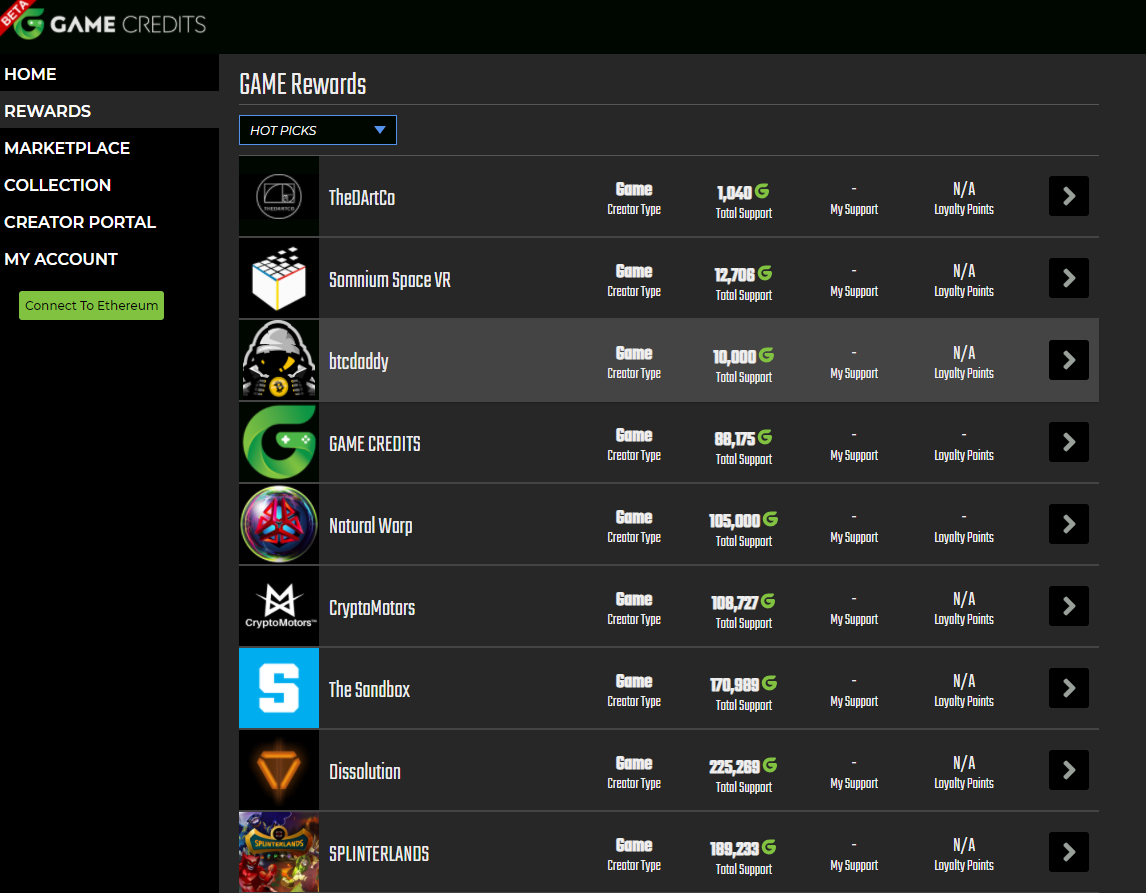
* You will see the games, artists, and other creators you can stake GAME on. For the purpose of this example, we’ll be adding support to Gaming with GAME.
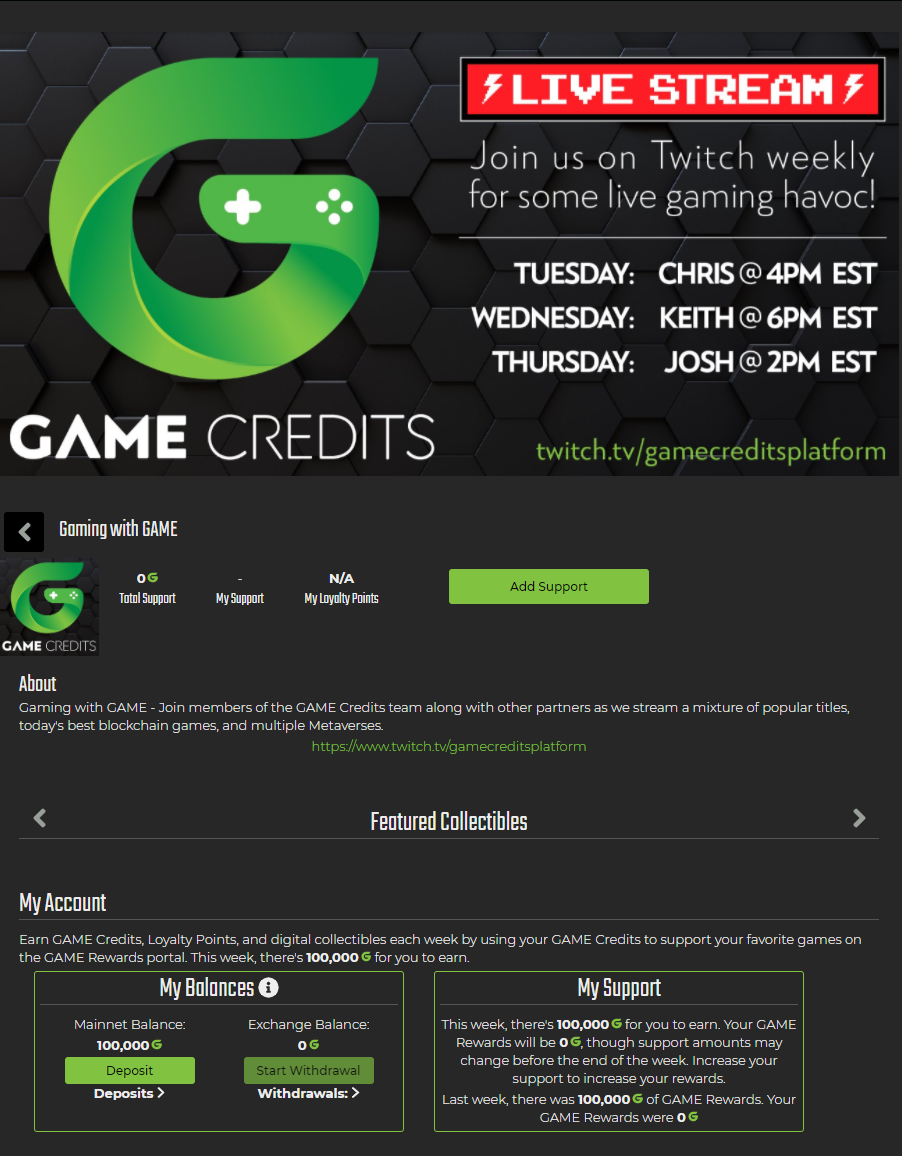
* Once you’re on the Gaming with GAME creator page, scroll down and you’ll see the Total Support, My Support, and My Available GAME. If you haven’t staked before, the ‘My Support’ should be blank. Your available balance is the amount of GAME in your MetaMask wallet. Click ‘Add Support’
**Step 2: Stake GAME On The Creator**
* At this screen, you can set how much of your total GAME you want to stake. Once you’ve filled that out, click “Set Support”. These transactions take place on the Ethereum mainnet, so you’ll need Ethereum present in your MetaMask wallet to cover the gas fees of the transaction.
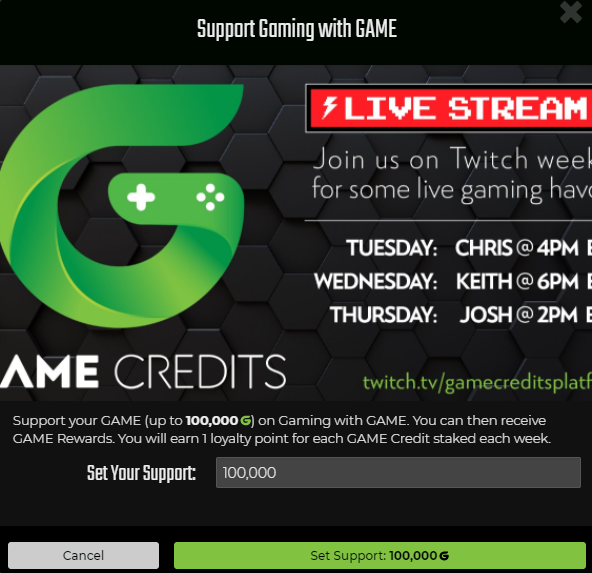
* MetaMask will prompt you to confirm the transfer. Click ‘Confirm’.

* Click back into your MetaMask extension, then look at the Activity tab. You will see the transaction is pending.
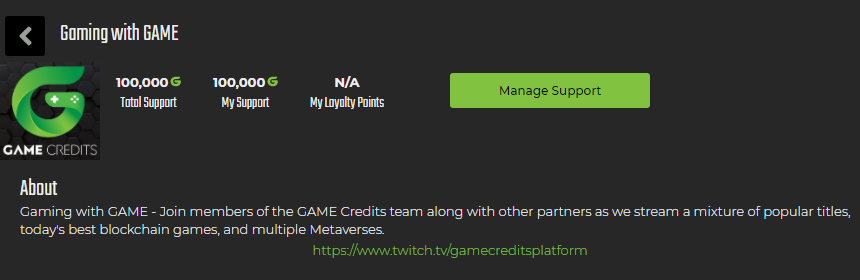
* Once the transaction has completed, you will see the ‘My Support’ amount has changed. You have successfully staked your GAME Credits!
**Step 3: Manage Your Support**
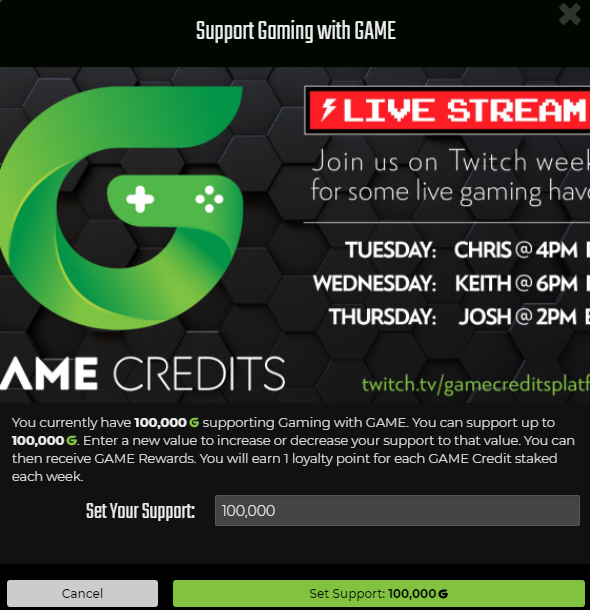
* At any point you can increase or decrease your support by clicking ‘Manage Support’. Once here you can change the value of your staked tokens.
* To remove all of your staking support, set the value to 0. This will remove your staked tokens for that particular creator and place them back in your MetaMask balance.
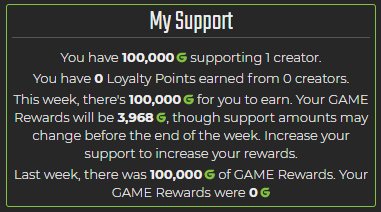
* Back on the rewards page, you can see what you have staked in two places, along with your expected rewards for the week.

# Earning NFTs With Loyalty Points
By adding support to your favorite creators on the GAME Credits Portal, users have the benefit of earning Loyalty Points (LPs) in addition to GAME. Loyalty Points are creator specific, meaning you earn LPs only on the creator on which you have GAME staked.
* Loyalty Points are paid out weekly at a GAME:LP 1:1 ratio. You will earn 1 Loyalty Point per 1 GAME staked on the Portal each week.
* Loyalty Points can be used to purchase NFTs generally and are often a purchase option for special edition NFT collectibles as well as some other unique perks the creator may decide on.
* Some creators may not offer Loyalty Points as a reward.
* Your LP balance is visible next to the “My Support” box when you click on a specific creator’s page.

# Creating a Creator Profile
The GAME Rewards Portal offers a multitude of benefits at little or no cost to creators and takes only moments to configure. This allows creators to implement a variety of useful utilities to help increase fan engagement and reward their followers.
**Benefits:**
* Increase user engagement, allowing your fans to support you by “staking” their GAME on your Rewards profile.
* Both users and creators are rewarded every week for staking their game proportional to the amount of GAME staked on your entity, then split 50/50 between the creator and their supporters.
* Access to the GAME Foundry to mint your own NFTs on the GAME-Polygon (Matic) sidechain GAS FREE - No gas fees for minting, listing or selling your NFTs.
* Reward your users with Loyalty Points allowing them to claim custom in-game items, collectible NFTs, or other art based NFTs.
**Requirements:**
* Have a web 3.0 Ethereum wallet such as MetaMask (recommended) installed.
* Have Ethereum in the wallet to pay for the gas fee required when signing up.
* A gas fee is required to create a mainnet creator account to take advantage of GAME staking which utilizes a mainnet smart contract. If you are not interested in staking or Loyalty Points, you can create a sidechain only creator account to create and sell NFTs without incurring a gas fee. For more information, click here.
**Types of Creator Profiles**
**During signup you will be asked which type of creator profile you would like to create. The following images offer a description of each type of profile. Both types of creator profiles allow creators to design, mint and sell NFTs without paying gas. The primary distinction between the two types of profiles is that “Creator (Free)” accounts are not eligible to have GAME staked on them by supporters. Only “Partner (Paid)” accounts are able to have GAME staked on them by supporters to earn additional passive GAME income. The “paid” portion of the partner account refers only to the initial gas fees required by the smart contract upon signup as a creator.**
**Creator (Free)**

**Partner (Paid)**

**Step 1:**
* Ensure you have MetaMask installed.
* Browse to app.gamecredits.org/creators.
* Click the green “Connect to MetaMask” button on the left hand panel.
* Once connected, you should see your wallet address visible in the left hand pane as shown below.

**Step 2:**
* Click “Get Started” which will pop out the Creator Signup window as shown below.

* Fill in all fields. Creator name is your or your organization’s name. WebsiteI is a link to your website or external content. Referral link can be used if you have an exchange referral link or other link you want supporters to support you with (this field is optional). The description field is a description of you/your content. The creator icon is what will be visible in the list of games and partners on the rewards portal. The marketing image is a banner users will see when they click on your listing on the rewards portal. The partner type is described earlier in this document.
* Once finished, click “Add Creator.” You will be prompted by MetaMask to complete the transaction. Once the transaction completes, the listing will be visible. Below is a completed listing showing Nova Blitz as an example.

* You may notice the “Featured Collectibles” field under the listing. This is where creator specific NFTs will be displayed on your creator page. Check out our how-to on using the GAME Foundry to begin minting your own NFTs today! ([Minting using the GAME Foundry](https://docs.gamecredits.org/creators/creating-and-selling-nfts))
# Creating and Selling NFTs
Minting non-fungible tokens (“NFTs”) with the GAME Foundry provides a variety of options to creators and allows them to mint NFTs without any gas fees on the MATIC blockchain. File types supported are JPEG, PNG, MP4, and GIF with a 50MB file size limit. Additionally, creators have the ability to include secondary “unlockable” content viewable only by the purchaser of the NFT.
**Requirements:**
* Already signed up as a creator. (See setup documentation [here](https://docs.gamecredits.org/creators/creating-a-creator-profile))
* The NFT properties you wish to mint, including the media file, description, and price.
**Step 1: Navigate To The Creator Portal**
* Connect to the Creator portal at app.gamecredits.org using the same wallet you signed up with.
* In the left-hand panel click the “Creator Portal” button, click on your entity; then click “Collectibles.” You will see the “Create New Collectible” option presented.

**Step 2: Fill In The Details For Your Creation**
* After clicking “Create New Collectible” the minting window is presented. Fill in all details for your NFT and click “Create.”
* **Standard NFTs:** Standard NFTs allow creators to design and mint NFTs in a variety of aspect ratios and file types including JPEG, PNG, MP4, and GIF.
* **Gacha NFTs:** Gacha type NFTs will come with a randomly assigned rarity level and a frame. The color of the frame changes with rarity. Gatcha NFTs are currently limited to still images in a square aspect ratio.
* **Unlockable Content:** Unlockable content allows you to upload a separate file or piece of information that can be used and “unlocked” exclusively by the buyer.

**Step 3: Review Your Creation And Make Edits**
* Return to the “Collectibles” section under your entity name and the newly created NFT will now be visible. From this page you are able to edit the properties of the NFT and view all currently created collectibles.
* **Please note:** NFTs on the GAME Credits Platform are not minted until a sale takes place. In order to delist or hide an NFT from sale, please set the sale price to 0. This will not make the NFT free but will remove it from public visibility on your creator page.

# Earning Staking Rewards As A Creator
Supporters have the ability to stake GAME on their favorite creators. Each week, 100,000 GAME is paid out across the GAME Credits Platform to both creators and their supporters. Payments are made proportionally based on how much support a creator receives vs. total support on the portal. The GAME Reward is then split 50/50 between specific creators and their supporters.
Claiming your sales and staking rewards from supporters is easy with the GAME Credits Platform. This process will require that you have Ethereum in your administrative MetaMask account to cover the gas fees associated with processing the claim transaction.
**Steps:**
* Connect to app.gamecredits.org using the administrative MetaMask account for your creator page.
* On the left hand panel select “Creator Portal” then “Earned Rewards.”
* Here you will see a breakdown including the week #, your weekly support vs total portal support, your earned GAME rewards from staking, and your sales balance.

* Click the banner image to collect staking rewards.
* Approve the transaction in the MetaMask prompt. Wait for the transaction to confirm. Done! Your collected GAME will now be visible in your MetaMask on the Ethereum mainnet.
* Please note: The “Withdraw” button allows creators to collect sales proceeds from NFT sales on the MATIC sidechain.